I have a DS920+ and a DS925+ up and running. Because of the way the house is organized the DS920+ is connected to the network but in a way that is super slow.
I wanted to move a lot of files between the two but not sync them. I don’t have a switch nearby that I can use, so I was going to use a USB drive but that doesn’t seem to be working under 7.3 (see other post).
Is it possible to connect the two NAS units together using the network ports on the back, since there are two of them on each? Or do I have to get hold of a switch?
Not these days LOL. 20 years ago would have been no issue. It’s only needed for a short time so I think I’ll figure out something that doesn’t need me to remember my developer days
Configure a static IP address on the LAN2 port on each NAS. Use an address that differs from your internal network. For example, if your internal network’s addresses start with 192.168.x.x, use:
for the DS920+: 10.0.0.20
for the DS925+: 10.0.0.25
and use 255.255.255.0 as the subnet mask in both instances.
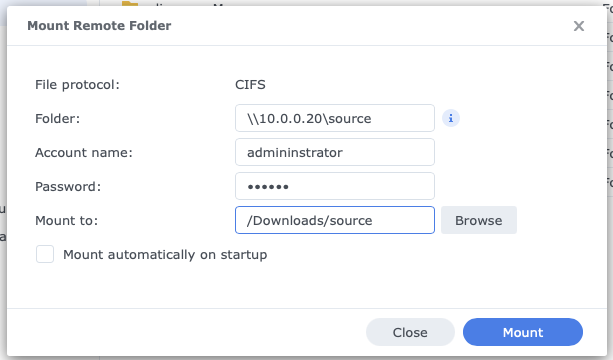
Next, put the DS920+ next to the DS925+ and connect both LAN2 ports with an Ethernet cable (no switch required). Log in as an administrator on the DS925+, open File Station, and select a shared folder where you want the remote folder to appear (Mount folder). I used \Downloads shared folder in the screen shot below.
Next, go to Tools > Mount Remote Folder > CIFS Shared Folder. In Folder, enter the name of the source on the DS920+. Account and password of an administrator account on the DS920+ and Mount to are filled in automatically. Click Mount.
Browse to the Mount folder and use the Copy to/Move to command in File Station for fast copying.
Great! Thank you for taking the time to put all that down - much appreciated. I’ll take a look when I get a chance and let you know if I have any questions.