Hi, I’ve been trying to do a 2.5G ugreen ethernet to usb-c adapter method to boost my transfer speed with the 2.5GbE ethernet connection from my DS925+ NAS to my laptop, reason being my laptop (a Thinkpad T590 with Windows 10) only has 1GbE Ethernet port and i wanted to bypass it by using the USB-C port.
But the speed did not improve and remains the same, its between 70-100mbps. I have tried with the thunderbolt 3 port, normal usb-c port, but the speed is the same and so does a direct ethernet from the NAS to the laptop directly, the speed is the same.
I have installed the correct driver for both the laptop and the NAS.
I am connecting my hardware as follows: Laptop - ethernet adapter - ethernet cable - into one of the ethernet ports behind the NAS, is this the correct way to do it ?
Im sure im doing something wrong, any one can guide ?
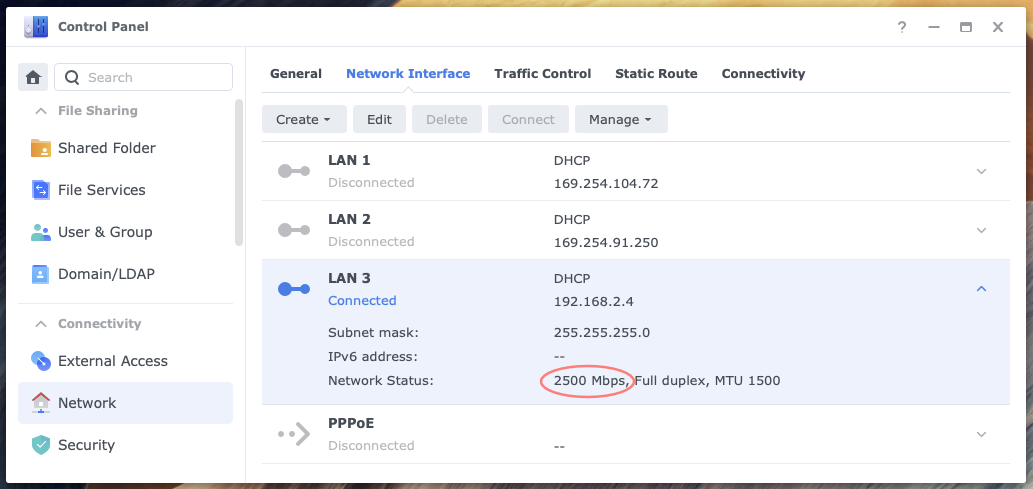
Starting with the NAS, does it see the connection as 2.5GbE or 2500 Mbps? You can check this in Control Panel > Network > Network Interface. See screenshot above. Make sure you check the right LAN interface.
On your laptop, is the 1GbE also connected to the NAS, either directly or via a switch? Likewise, is the NAS connected via another LAN interface, either directly or via a switch?
Yes sorry i should have included more info for this matter.
So firstly, i am using Unifi internet with a Unifi GN630V modem-router device, the NAS is directly connected to this, there is no switch being used here.
WIFI is disabled via flight mode, and only connection is through the LAN connection between laptop and NAS. When connected, only access the laptop has is only the NAS, not even internet.
Connection from the laptop has been tried with the below both method:
standard 1GbE ethernet port into one of the ethernet port behind the NAS via ethernet cable
usb-c into one of the ethernet port behind the via ethernet cable with 2.5GbE ethernet adapter
when im using the ethernet adapter, from NAS side the network status is indeed 2500 Mpbs, vice versa when i use only the standard laptop ethernet port into the NAS, the network status is only 1000 Mbps.
however, when i try to move a file, both option 1 and 2, yielded the same transfer speed of about 70-100mbps, no difference..
Based on the additional information you provided, it is strange indeed that you do not get higher throughput with 2.5 GbE versus 1 GbE.
Do you use a network share to connect and transfer or do you log in to DSM and use File Station. The latter option is slower although you should still see a difference.
I suggest establishing an SMB connection from Explorer (Windows) or Finder (Mac) to the network share. SMB is much faster than HTTP. Let’s see how that works out.