Recently watched Will’s video about Synology Drive Top Five Mistakes. He mentions that you can improve connection speed with QuickConnect by forwarding port 6690. So I decided to try it. On DSM went to External Access>Router Configuration. I was surprised to see that a rule for port forwarding to 6690 had already been set up. I never set up this rule. I then checked my router (also Synology) and found a port forwarding rule had been set up by UPNP. So I am trying to figure out how this happened. The only thing I can think is that it was set up automatically when I installed Synology Drive. Does anyone know if this is true?? Also, I note that I cannot delete this forwarding rule or uncheck it, so it seems Synology Drive is requiring it. Any thoughts?? Thanks.
This is a serious security concern. UPnP should always be disabled unless you puposely and knowingly allow it. Disable it now.
Thanks. I understand the UPnP issues.
However, what I am trying to figure out is how the port forwarding rule to 6690 happened and why I cannot delete it. Did Synology Drive do it automatically when I installed Drive? Is Drive preventing me from deleting the forwarding rule? Will’s video about Synology Drive Top Five Mistakes seemed to indicate that the port forwarding rule had to be done manually, with no indication that it would be done automatically by Drive.
Enabled seemingly by default on my instance after installing Synology Drive…
Did you try the Reset button (I haven’t)
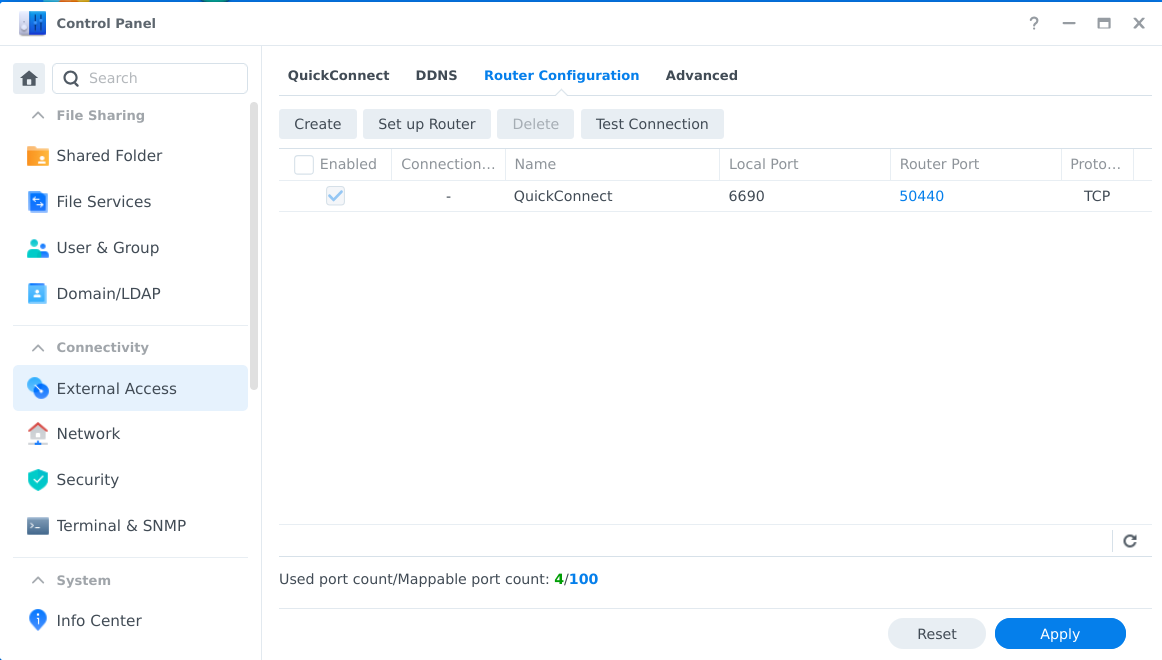
Thanks graham,
Yes, that is exactly what I experienced, except on my NAS the router port is set to 52802 (not sure where that came from). So this seems to confirm that the installation of Synology Drive is automatically creating a port forwarding rule for port 6690. This also created the same rule on my Synology router and firewall, apparently by UPnP.
Now what I do not understand is that there is no way to disable or delete this port forwarding rule. The Delete tab is grayed out and cannot change the Enabled check box. I guess Synology Drive will not let you delete it. I did click the Test Connection Tab and it responded with Connection OK. Not sure what you are referring to with trying the Reset button, but I have not tried anything else. All the documentation I can find from Synology in reference to Drive and QuickConnect says you can set up a port forwarding rule, but no indication it is done automatically. Seems to me this is something that Synology should warn about.
Try this:
Go to Control Panel > External Access > QuickConnect tab > Advanced Settings button > Applications/Services.
Look at the items checked. Disable Synology Drive and Apply.
Now try again to remove the port forwarding rule.
At the bottom to the left of the blue Apply button (although I think that might only refers to resetting any changes you made this session before hitting Apply in the last edit session.
Can you give the URL for Will’s video, please?